DAI 26 Release Notes
The notes below provide descriptions of the new features and changes introduced in the 2026 releases of Eggplant DAI.
The online documentation contains the latest information about DAI releases. If you are viewing this documentation online, you are seeing the latest update. If you are using the documentation embedded within DAI, please see the Release Notes on our Documentation website at: https://docs.eggplantsoftware.com/dai/dai-release-notes/ for the latest information.
Any potential compatibility issues are highlighted.
To the extent you are entitled to a copy of the source code for the open source software distributed with this product, a free copy will be provided. Please contact us with your request.
System Requirements
You can find supported operating systems and system recommendations for this release on the Prerequisites page.
Upgrade Notes
The following summarizes the important things you need to know if you are upgrading DAI from an earlier version. For details about upgrading to specific versions, see Upgrade Notes. Whenever you upgrade, we strongly recommend that you back up your DAI data. Click the Take a Backup tab below for instructions.
- Upgrade Notes
- Take a Backup
-
26.3.1 is the latest release of DAI. You can find the latest information about the 26.3.1 release in the online version of the Release Notes at: https://docs.eggplantsoftware.com/dai-release-notes.
-
Upgrading to DAI 26.3.1 does not have any special upgrade instructions. You can just back up your system and then run the 26.3.1 Setup program as described in Installing or Upgrading (DAI 26.2.1 and Higher).
-
As always, be sure to back up your system before running the Setup program as described in Installing or Upgrading (DAI 26.2.1 and Higher).
-
If you are upgrading from an older version and have skipped some releases, please be sure to read the release notes of the versions you have skipped to ensure you do not miss any important information or tasks you need to complete before upgrading.
-
-
Upgrading from releases prior to 26.2.2:
-
All DAI users must clear their browser caches and then restart their browsers after upgrading to 26.2.2 or above. This is necessary because of a fix that the DAI 26.2.2 release includes to resolve a display issue in Google Chrome and Microsoft Edge browser versions 150 and possibly higher. This issue is also seen in older versions of DAI. For older versions, however, you must download and apply the a patch for this issue. See the Release Notes for your older version for instructions. This issue impacts both on-premises Windows installations and (Linux) container deployments of the DAI Server.
-
Upgrading container deployments to 26.2.2 also requires that you perform an additional upgrade task because of the upgraded RabbitMQ component. See Upgrading to 26.2.2 on the Deploying Eggplant DAI in Containers page for instructions.
-
-
Starting with the 26.2.1 version, you must configure your DAI Servers to use secure (HTTPS) connections, and consequently you must access DAI with https in the URLs that you enter in your browsers and the DAI environments and agents. See Release 26.2.1 (May 2026) for important information about this release.
-
You must upgrade to DAI 26.1 before you start a DAI 26.2.x upgrade. See Upgrade Notes for important information about upgrading.
-
Some versions of DAI are only compatible with specific releases of Eggplant Functional (EPF), so you must upgrade EPF alongside DAI in these situations:
-
When you upgrade to DAI 26.3.1, you must also upgrade to EPF 26.3.0 or 26.3.100. This is because DAI 26.3.1 is only compatible with EPF 26.3.0 or 26.3.100.
-
When you upgrade to DAI 26.2.2, you must also upgrade to EPF 26.2.2 or 26.2.102. This is because DAI 26.2.2 is only compatible with EPF 26.2.2 or 26.2.102.
-
When you upgrade to DAI 26.2.1, you must also upgrade to EPF 26.2.1.1 or 26.2.101.1. This is because DAI 26.2.1 is only compatible with EPF 26.2.1.1 or 26.2.101.1.
-
When you upgrade to DAI 26.2.0, you must also upgrade to EPF 26.2.0 or 26.2.100. This is because DAI 26.2.0 is only compatible with EPF 26.2.0 ro 26.2.100.
-
-
The upgrade may take 10-20 minutes to complete.
-
When you upgrade from 26.1 to DAI 26.2.1 or 26.2.2, or from 26.2.0 to 26.3.x, the first time you log in, you will see the Spaces are here! pop-up message. In 26.2.0, we released the Spaces feature and as part of that implementation we changed the landing page you see when you log into DAI to be the Spaces page. See the Spaces in DAI feature description in the 26.2.0 Release Notes for more information about this feature and also see the Upgrade Notes for important information about the first time you upgrade to a release that has spaces.
-
For information about upgrading container deployments, see Upgrading on the Deploying Eggplant DAI in Containers page.
Before you upgrade a DAI Server instance on Windows, you need to back up your DAI database folders and configuration files. If there is a problem with your upgrade, you will want to restore your DAI Server to this point. If you have any questions or would like help testing your database before you upgrade, please contact your Technical Success Manager or our Customer Support.
Follow the steps below to back up a DAI Server on Windows:
-
Stop the DAI Server/Windows Service before you take a backup.
-
Copy the following DAI Server files and folders from the
C:\ProgramData\Eggplant\Digital Automation Intelligencedirectory somewhere outside theProgramDatadirectory, or to another machine or backup device, using File Manager or a command prompt:
- The
datafolder - The
filesfolder for DAI versions 26.2.1 and higher orminiofolder for DAI versions 26.2.0 and older (Note that the 26.2.1 and higher Setup programs on Windows will migrate the data from theminiofolder if it exists to thefilesfolder) - The
config.ymlfile - The
settings.inifiles
You do not need to back up the DAI credentials because they are saved in the Windows Credential Manager
-
Restart the DAI Server/Windows Service.
-
Run the installer to for the new version to which you are upgrading.
For information about restoring a backup, see Backing Up or Restoring the DAI Server.
Release 26.3.1 (September 2026)
DAI version 26.3.1 contains the following enhancements and defect fixes:
Features
Hosted Execution Container-Based Support
Hosted Execution provides an automated way of provisioning SUTs and EEs for DAI tests. This includes creating the SUTs and EEs themselves and also configuring them within DAI so they can be used to run tests.
The original Hosted Execution concept was conceived some time ago, when for various reasons it was considered impractical to run Hosted Execution within containers. The solution was therefore based on using AWS Spotfleets/instances to provide the SUTs and EEs. This has worked reasonably well but has had some limitations. Specifically:
- The AWS based solution meant it was not suitable for on-Prem customers and was only offered as part of Eggplant cloud.
- The startup time of instances meant that we had to have a costly standby pool;
A new version of Hosted Execution has now been developed which uses containers running within the Kubernetes cluster.
Test Results Page Updated to Improve Troubleshooting
Enhanced the Test Results page so that relevant errors, exceptions and screenshots are displayed more prominently. This will help improve troubleshooting for test failures.
TMI Support for Azure DevOps
We have added support for reporting test results in Azure DevOps. This allows you to connect your Azure DevOps to DAI and post your test results to your Azure DevOps Test Management. This feature is available for both model and script based tests.
Support for git branching switching in Runner Page
On the Runner page, there is now the capability to switch git branch for the test execution. This is useful for testing different branches of the same repository. This feature is available for both model and script based tests.
Defect Fixes
-
Fixes an issue where the Test case parameter value would be regenerated even though it was set in the test case. (CRD-2045)
-
Fixes a problem where Keycloak admin credentials were leaked to the console when upgrading DAI. (CRD-2050)
-
Fixes an issue where the main model in a space import retained old UUID references and could not automatically associate with newly imported submodels. (CRD-2040)
-
Fixes an issue where the Model Dashboard Test Results Record graph displayed directed test case runs as exploratory runs. (CRD-1794)
-
Fixes an issue where the
currentStatedefault parameter did not receive a value when running a test case. (CRD-1591) -
Fixes an issue where creating a model through the REST API with a period in the
model.jsonname prevented the model from running. (CRD-871) -
Improves the error message shown when a DAI submodel cannot be found. (CRD-1558)
3rd Party Component Updates
DAI 26.3.1 includes the following third-party component updates:
| Component | Previous Version | Upgraded To |
|---|---|---|
| RabbitMQ | 4.3.4 | 4.3.6 |
| Nginx | 1.31.3 | 1.31.6 |
| PostgreSQL | 17.10-2 | 17.11-3 |
| Erlang | 27.3.4.14 | 27.3.4.18 |
| Keycloak | 26.2.5.21 | 26.7.4 |
Release 26.3.0 (August 2026)
DAI version 26.3.0 contains the following enhancements and defect fixes:
Features
Adds Git Information in Your Test Results
Git information is now displayed directly in the Test Results page, making it easier to correlate test outcomes with your code changes. You can also filter the test results by your Git connection or branch.
Provides a Redesigned DAI Login Screen
We've refreshed the login experience with an improved, more intuitive design.
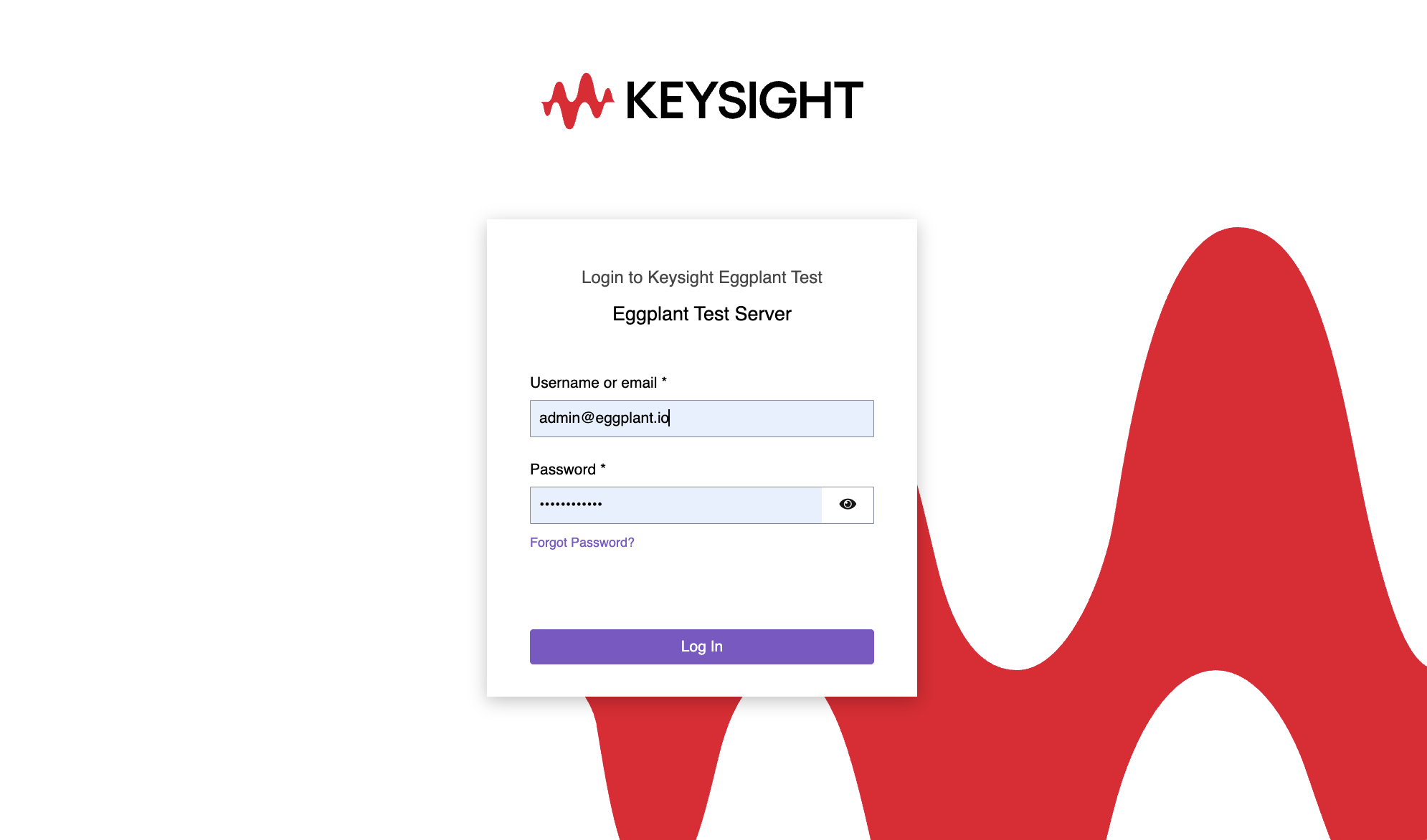
Release 26.3.0 refreshes the DAI login experience with a redesigned login Screen
Improves Browser Navigation with Asset Tab Titles
We've introduced better browser navigation with dynamic tab titles. Browser tabs now display your asset names, making it easier to manage multiple tabs.
Simplifies Suite Version History View
We've simplified the suite version history view by removing the Author column from DAI, creating a cleaner interface focused on the most important version details.
Defect Fixes
-
Test configs that fail with an Error State show no statistics. (CRD-2003)
-
Coverage resets with minor changes. (CRD-979)
-
Attaching and removing a snippet to a model takes a long time. (CRD-2012)
-
API clients do not have permission to query requirements. (CRD-2021)
-
Changing the Execution Environment (EE) linked to a system under test (SUT) is not reflected in test configs. (CRD-1994)
-
Special characters in a password cause the DAI Git connection test to fail with
422responses. (CRD-1980)
DAI 26.2.2 fixed an issue that would occur when you navigated to a new page in DAI and the page was blank. This issue occurred with Google Chrome version 150, or the Edge version based on it. It may also occur in later versions of these browsers. The issue impacted both on-premises Windows and container deployments (Linux) of the DAI Server.
Older versions of DAI still experience this issue. To resolve this issue in older versions of DAI, you will need to run a script to fix it. There are different scripts for the on-premises Windows and container deployments of the DAI Server. See Supported Browsers on the Prerequisites page for information about running the script on Windows installations, and Software Recommendations for Eggplant Deployments with Kubernetes for information about running the script for container deployments.
3rd Party Component Updates
DAI 26.3.0 includes the following third-party component updates:
| Component | Previous Version | Upgraded To |
|---|---|---|
| Keycloak | 26.2.5.21 | 26.7.0 |
| RabbitMQ | 4.3.1 | 4.3.4 |
| Nginx | 1.31.1 | 1.31.3 |
| MinGit | 2.55.0.3 | |
| Erlang | 26.2.5.21 | 27.3.4.14 |
| Postgres | 17.10-1 | 17.10-2 |
CVE Fixes
DAI 26.3.0 includes the following CVE-focused security updates:
| Dependency | Remediated Vulnerabilities |
|---|---|
| Bouncy Castle (Keycloak) | GHSA-574f-3g2m-x479 / CVE-2025-14813 |
| strawberry-graphql | GHSA-qfwv-87qj-98xq / CVE-2026-47706 / GHSA-fr49-mhgj-crfc / CVE-2026-47707 |
| msgpack | GHSA-6v7p-g79w-8964 |
| aiohttp | CVE-2026-47265 / GHSA-hg6j-4rv6-33pg / CVE-2026-34993 / GHSA-jg22-mg44-37j8 |
Release 26.2.2 (July 2026)
DAI version 26.2.2 contains the following enhancements and defect fixes:
Features
Expands the Test Result Information Available through the API
DAI 26.2.2 expands our public Test Results API to give you more test execution information. You can see the complete list of supported API methods on our Eggplant Public API Version 2.0 page.
Supports Specifying the Git Branch at the Test Config Level
If you store your test suites in a Git source control repository that you have connected to DAI, DAI 26.2.2 now allows you to specify which branch in your Git repository you want to use at the test configuration (test config) level. This setting is under Execution Settings as described in Step 9 under Step 1: Configure the General information for the Test Configuration. Note that you can also now see when a suite is in a connected Git repo, as soon as you select the suite for a script-based test, or a model that has a suite associated with it for a model-based test as described in step 5 in the same section.
Provides an API to Enable Consolidation of Multiple DAI Instances
A new API in DAI 26.2.2 enables us to more easily consolidate multiple DAI instances. If you have multiple DAI instances that you want to consolidate, please contact your Customer Success Manager or Product Support for Keysight Eggplant Software for assistance.
Defect fixes
-
Fixes an issue that occurred when you navigated to a new page in DAI and the page was blank. This issue occurred with Google Chrome version 150, or the Edge version based on it. It may also occur in later versions of these browsers. The issue impacted both on-premises Windows and container deployments (Linux) of the DAI Server.
noteOlder versions of DAI still experience this issue. To resolve this issue in older versions of DAI, you will need to run a script to fix it. There are different scripts for the on-premises Windows and container deployments of the DAI Server. See Supported Browsers on the Prerequisites page for information about running the script on Windows installations, and Software Recommendations for Eggplant Deployments with Kubernetes for information about running the script for container deployments.
-
Fixes an issue where browsers became unresponsive while waiting for large test result logs to display, followed by poor performance while subsequently scrolling the loaded results. (CRD-1951)
-
Fixes an issue where DAI only tried to stop Eggplant Functional (EPF) for the instances it started and connected to successfully. When DAI does not stop Fusion Engine, EPF retains those licenses preventing other users from using them. (CRD-2004)
-
Fixes an issue where the screenshot failed to open when users clicked the link in the logs of a submodel. (CRD-1964)
Documentation Updates
This release includes the following documentation updates:
-
A new page called DAI Secure (HTTPS) Connections and Certificates, which is dedicated to explaining the types of secure certificates you need to use with the DAI Windows Server installation configured with secure HTTPS connections. In versions 26.2.1 and higher, all DAI Server installations on Windows must use HTTPS connections.
-
A rewrite of the Execution Environments page, which includes updated information about how to work with Spaces in the DAI Design Agent.
-
A removed page: the deprecated DAI Public API Version 1.0 Endpoints page. The current version of the DAI Public API is 2.0, which is documented on the Eggplant Public API page. For an introduction to our public API endpoints, please see Public API Overview.
3rd Party Component Updates
DAI 26.2.2 includes the following third-party component updates:
| Component | Previous Version | Upgraded To |
|---|---|---|
| Erlang | 26.2.5.19 | 26.2.5.21 |
| Keycloak | 26.1.1 | 26.6.3 |
| Nginx | 1.30.0 | 1.31.1 |
| Postgres | 17.9-3 | 17.10-1 |
| Python | 3.13.13 | 3.13.14 |
| RabbitMQ | 4.2.5 | 4.3.1 |
Security Updates
DAI 26.2.2 includes the following CVE-focused security updates:
Some CVEs are resolved by the updated 3rd party components listed above. For example, check the Keycloak website for the list of CVEs remediated by the upgraded version listed above.
| Dependency | Remediated Vulnerabilities |
|---|---|
| Keycloak | CVE-2026-9087 - Insufficient verification proof scoping enables identity provider account linking attack and account compromise |
| python Starlette | CVE-2026-54283 CVE-2026-48818 CVE-2026-54282 CVE-2026-48817 |
| python aiohttp | CVE-2026-54273 CVE-2026-54277 CVE-2026-54274 |
| python-multipart | CVE-2026-53539 - Quadratic-time querystring parsing with semicolon separators causes CPU denial of service |
| BDSA-2026-13994 | CVE-2026-34182 - OpenSSL Vulnerable to Integrity Check Bypass via Insufficient Input Validation in ossl_cms_EncryptedContent_init_bio Function |
Release 26.2.1 (May 2026)
DAI version 26.2.1 contains the following enhancements and defect fixes:
Features
DAI 26.2.1 contains the following new features:
Improved Security with HTTPS Connections
DAI version 26.2.1 introduces improved security for accessing DAI from your browser. The improvements not only provide greater security but compliance with the EU Cyber Resiliency Act (EU-CRA), and compatibility with our Eggplant IAM tool (our Keycloak-based product for managing identity and access management (IAM)). The improvements include:
-
HTTPS as the default and only supported access method for DAI; HTTP is no longer supported
-
Support for the following Transport Layer Security (TLS) certificate types:
- Publicly trusted Certificate Authority (CA) certificates
- Private or enterprise CA certificates, for example, from your own company
- Self-signed certificates from Eggplant, which you can generate during installation but are not recommended for production use
Detailed information about the certificate requirements is provided on a new page: DAI Secure (HTTPS) Connections and Certificates.
If you are upgrading your DAI Server to 26.2.1 on Windows, and your existing DAI Server installation is configured for HTTP access, you will need to reconfigure it for HTTPS. See Upgrade Notes for Windows DAI Servers for what's required to perform this upgrade.
This HTTPS requirement also applies to the DAI Environments and Agents. Therefore, on all platforms, you will need to regenerate the .ini files for all of your environments/agents after installation because the DAI URL will be different.
Note that container deployments of the DAI Server are not affected because they have always required HTTPS configurations.
Support for Jira Zephyr Test Management Tool Integration
DAI 26.2.1 now integrates with another test management tool by adding support for test results with Jira Zephyr. Integrating third-party test management tools with DAI streamlines test case synchronization and reporting. Once you connect DAI to a test management tool, DAI can automatically synchronize your test cases, requirements, and test results between the two systems. For more information, see Adding a Jira Zephyr Integration in the Test Management Tool Integrations page.
Updated DAI Server Installation Program for Windows
DAI 26.2.1 also provides a new Setup program for the Windows Server installation. The major change is to accommodate the new requirement to use HTTPS. Additionally, we also streamlined the Setup program so that there is essentially one workflow. (The previous installation process had two workflows: Standard and Advanced.) The new Setup program provides one workflow with the option to choose advanced options, which consist of specifying alternate locations for some folders that DAI creates.
Because the Setup program for 26.2.1 differs from the previous one for 26.2.0 and older versions, there are now two installation pages. See Documentation Updates below for more information.
DAI Internal Data Moved to File System
Some DAI internal data has been moved to the file system to ensure stability and continued support. This data was previously stored in MinIO (object storage), which is no longer being maintained. This migration will occur automatically after you upgrade to DAI 26.2.1. The migration does not require you to take any actions for this migration to occur. See Upgrade Notes for more information this change.
Spaces are Here
The first time you log into DAI after upgrading to DAI 26.2.1, you will see the Spaces are here! panel. This is to inform you of the Spaces feature that was introduced in DAI 26.2.0. The Spaces page became the landing page you see when you first log into DAI versions 26.2.0 and higher. For important information about the first time you upgrade to a release that has the spaces feature, see Upgrading from 26.1 to 26.2.0 on the Upgrade Notes page.
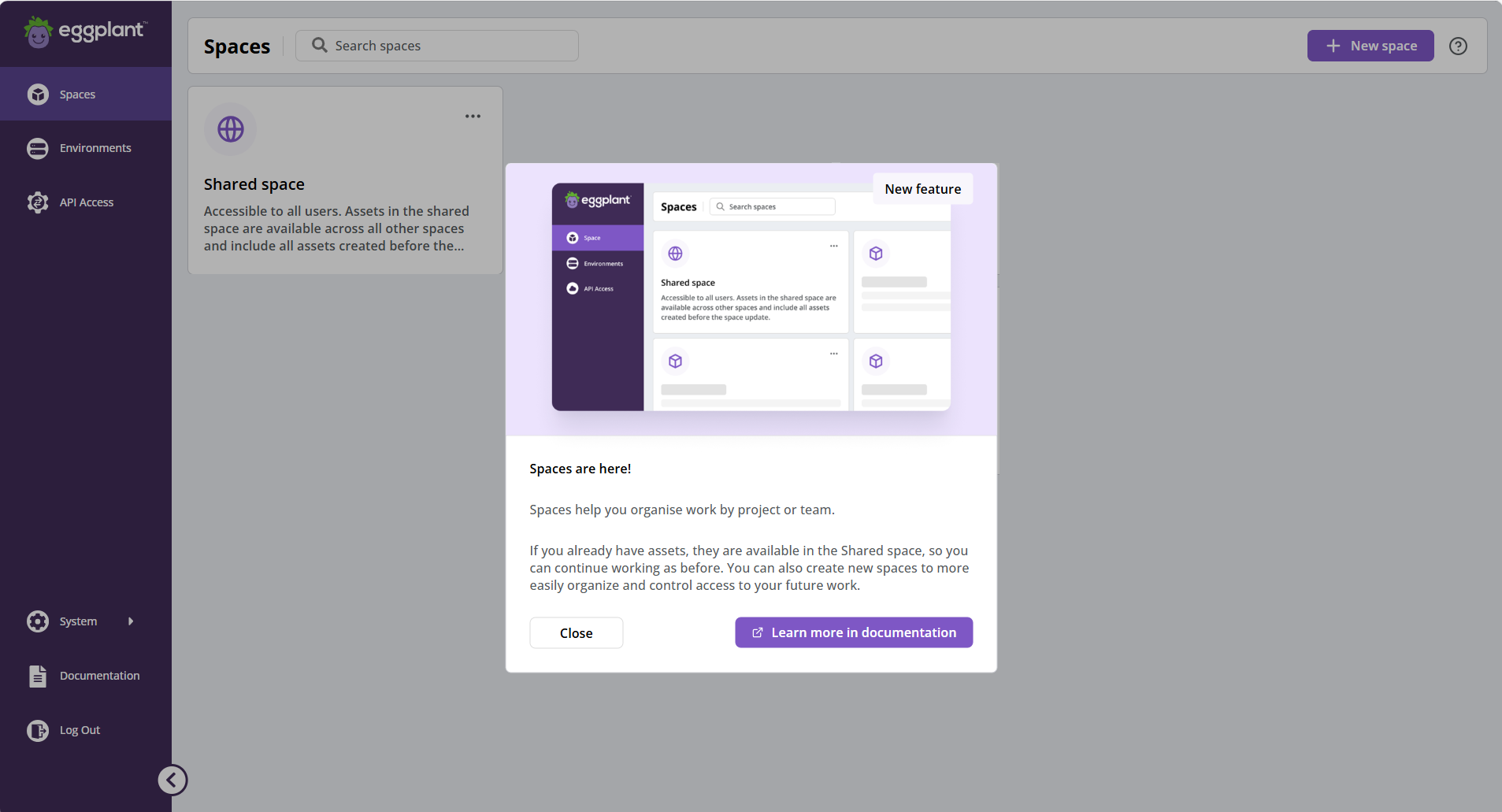
The Spaces are here! panel calling attention to Spaces feature in DAI
Known Issues
There is a known issue navigating to a new page in DAI where the new page is blank. This issue occurs with Google Chrome version 150, and the Edge version based on it. It may also occur in later versions of these browsers. This issue impacts both on-premises Windows installations and (Linux) container deployments of the DAI Server.
-
DAI version 26.2.2 includes a fix that resolves this issue. You do not need to take any actions if you upgrade to DAI version 26.2.2.
-
DAI versions 26.2.1 and older, however, do not include a fix. Therefore, you must run a script to enable older versions of DAI to display properly in these versions of Chrome and Edge.
There are different scripts to fix the issue in the DAI Server: one for Windows installations and one for container deployments. See Supported Browsers on the Prerequisites page for information about running the script on Windows installations, and Software Recommendations for Eggplant Deployments with Kubernetes for information about running the script for container deployments.
Defect Fixes
DAI 26.2.1 includes the following defect fixes:
-
Fixes an issue in DAI where it was not possible to delete an Eggplant test suite that referenced itself as a helper suite. (CRD-1976)
-
Fixes an issue with DAI Helm container deployments where customers on systems without internet access ("air-gapped users") experienced slow load times when they launched DAI due to access issues with font libraries. (CRD-1972)
Documentation Updates
DAI 26.2.1 includes the following documentation updates:
-
A new Installing or Upgrading (DAI 26.2.1 or Higher) page for the DAI Server on Windows because the installation process changed in DAI 26.2.1. The original page is still available for older versions as well. It has been renamed Installing or Upgrading (DAI 26.2.0 and Older).
-
A new page describing the digital certificate requirements for implementing DAI with HTTPS: DAI Secure (HTTPS) Connections and Certificates.
-
A new section describing the Zephyr test case management tool integration. See Test Management Tool Integrations for more information.
Third-Party Component Updates
DAI 26.2.1 includes the following third-party component updates:
| Component | Previous Version | Upgraded To |
|---|---|---|
| Nginx | 1.29.4 | 1.30.0 |
| Erlang | 26.2.5.15 | 26.2.5.19 |
| Keycloak | 26.5.5 | 26.6.1 |
| Postgres | 17.9-1 | 17.9-3 |
| Python | 3.13.12 | 3.13.13 |
| RabbitMQ | 4.2.4 | 4.2.5 |
Security Fixes (CVEs)
DAI 26.2.1 remediates the following security vulnerabilities:
| Dependency | Remediated Vulnerabilities |
|---|---|
| Multipart | CVE-2026-40347 / GHSA-mj87-hwqh-73pj |
| Psycopg2-binary | CVE-2025-69418 |
| Keycloak | - GHSA-xh32-c9wx-phrp / CVE-2026-3911 (Low) - GHSA-8g9r-9wjw-37j4 / CVE-2026-3429 (Medium) - GHSA-63v5-26vq-m4vm / CVE-2026-1190 (Low) - GHSA-x4p7-7chp-64hq / CVE-2026-2603 (High) - GHSA-cjm2-j6cm-6p6m / CVE-2026-3872 - GHSA-q35r-vvhv-vx5h / CVE-2026-3190 - GHSA-7xf9-4jfc-wgm4 / CVE-2026-3121 - CVE-2026-2092 / GHSA-wmxr-6j5f-838p (High) - GHSA-cphf-4846-3xx9 - GHSA-m297-3jv9-m927 / CVE-2026-3009 - GHSA-xv6h-r36f-3gp5 / CVE-2026-2575 (Medium) |
| Bug Hunting Keras | CVE-2026-1462 / GHSA-4f3f-g24h-fr8m |
| Pillow | CVE-2026-40192 / GHSA-whj4-6x5x-4v2j |
| Mako | GHSA-v92g-xgxw-vvmm |
| erlang-otp 26.2.5.15 | BDSA-2026-4048 / CVE-2026-23941 |
| aiohttp | GHSA-w2fm-2cpv-w7v5 / CVE-2026-22815 |
| Requests | GHSA-gc5v-m9x4-r6x2 / CVE-2026-25645 |
| strawberry-graphql | GHSA-hv3w-m4g2-5x77 / CVE-2026-35526 |
| Cryptography | GHSA-p423-j2cm-9vmq / CVE-2026-39892 |
| Requests | GHSA-gc5v-m9x4-r6x2 / CVE-2026-25645 |
| Pygments | GHSA-5239-wwwm-4pmq / CVE-2026-4539 |
| Unknown | GHSA-m959-cc7f-wv43 / CVE-2026-34073 |
| pygments | GHSA-5239-wwwm-4pmq / CVE-2026-4539 |
| Werkzeug | GHSA-29vq-49wr-vm6x / CVE-2026-27199 |
| python 3.12/1.13 | BDSA-2026-5095 / CVE-2026-4519 |
| npmjs:flatted 2.0.2 | BDSA-2026-4940 / CVE-2026-33228 |
| Bug Hunting Keras | GHSA-gfmx-qqqh-f38q / CVE-2026-1669 |
| Marshmallow | GHSA-428g-f7cq-pgp5 / CVE-2025-68480 |
| pyjwt | GHSA-752w-5fwx-jx9f / CVE-2026-32597 |
Release 26.2.0 (April 2026)
DAI version 26.2.0 contains the following enhancements and defect fixes:
Features
DAI 26.2.0 contains the following new feature:
Spaces in DAI
DAI 26.2.0 introduces Spaces, a new capability that helps your teams organize test assets and manage access within a single DAI instance. Spaces address common challenges encountered when managing large numbers of models, configurations, and test cases. See About DAI Spaces for information about using this exciting new feature.
The Spaces page will be the landing page you see when you first log into DAI. The Spaces page includes one common space, called the Shared space, which is available in all DAI installations.
If you are upgrading to DAI 26.2.0, be sure to read the Upgrade Notes for this release for important information about spaces and your existing assets.
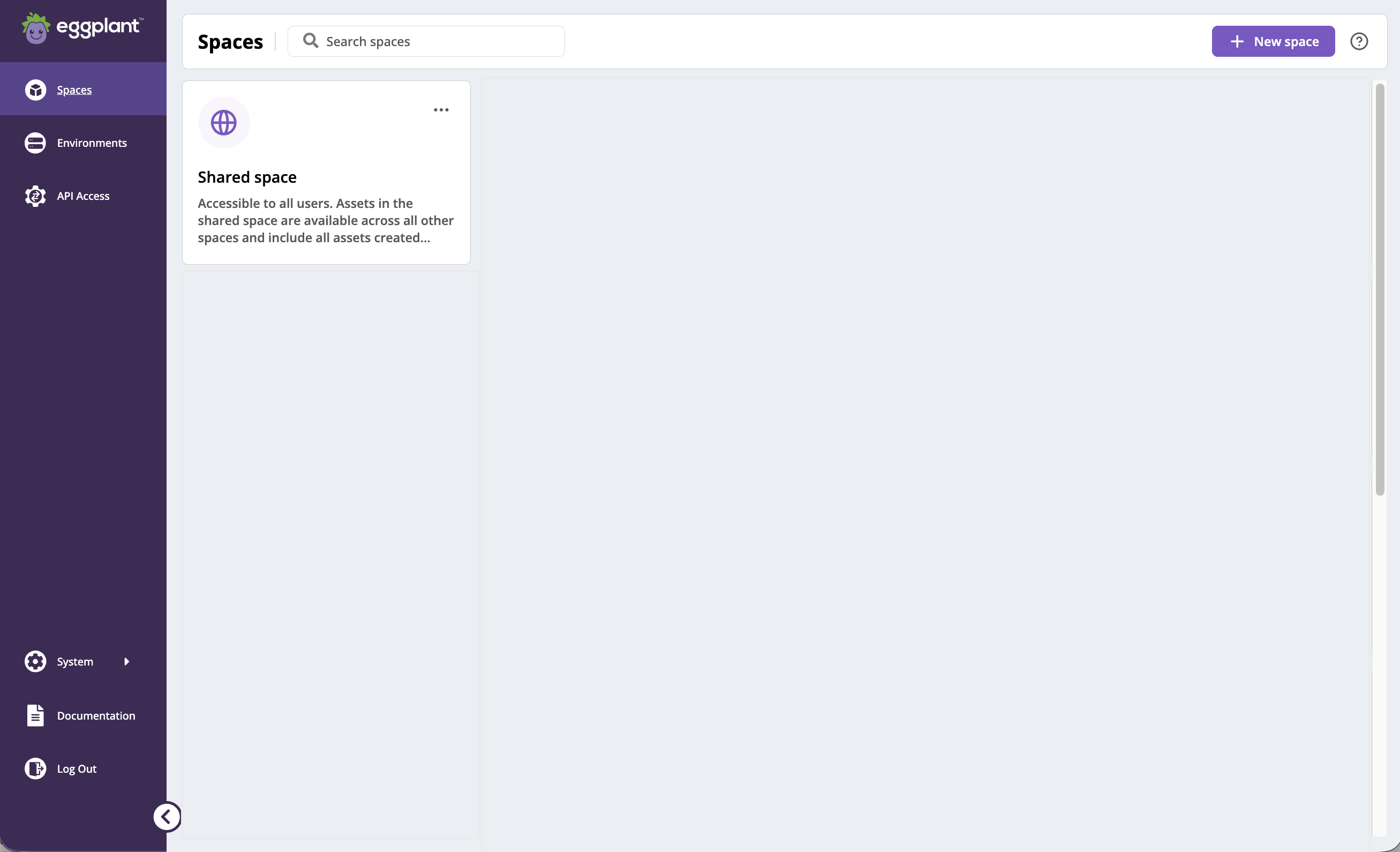
The new DAI Spaces feature page showing the common Shared space, which is now the landing page when you log into DAI
Security and Authentication
In the 26.1 Release Notes, we announced planned updates to DAI that introduce clearer and stricter expectations for TLS configuration. However, these changes will not be included in 26.2 release.
26.2 does not contain any TLS updates.
There is no impact to current deployments (TLS configurations). All existing configurations, including HTTP connections to the DAI Server, will continue to operate as they did in 26.1 and prior versions.
These security enhancements will, however, be implemented in a future release. To prepare, please be aware that the TLS updates will include:
-
HTTPS as the default access method for DAI Support for the following certificate types:
- Publicly trusted CA certificates
- Private or enterprise CA certificates
- Self-signed certificates explicitly trusted by the runtime
-
Continued support for alternative configurations, including HTTP-only setups, for environments with specific operational constraints (explicit configuration required)
We will announce a new timeline and publish updated documentation once these enhancements are finalized, providing you with ample time to review and prepare for the changes.
Known Issues
There is a known issue navigating to a new page in DAI where the new page is blank. This issue occurs with Google Chrome version 150, and the Edge version based on it. It may also occur in later versions of these browsers. This issue impacts both on-premises Windows installations and (Linux) container deployments of the DAI Server.
-
DAI version 26.2.2 includes a fix that resolves this issue. You do not need to take any actions if you upgrade to DAI version 26.2.2.
-
DAI versions 26.2.1 and older, however, do not include a fix. Therefore, you must run a script to enable older versions of DAI to display properly in these versions of Chrome and Edge.
There are different scripts to fix the issue in the DAI Server: one for Windows installations and one for container deployments. See Supported Browsers on the Prerequisites page for information about running the script on Windows installations, and Software Recommendations for Eggplant Deployments with Kubernetes for information about running the script for container deployments.
Defect Fixes
DAI 26.2 includes the following fixes for the following Customer Reported Defects (CRDS):
-
Resolves an issue where the Origin field on the DAI Test Cases page was limited to 40 characters for existing test cases and 59 characters for new test cases. You can now enter up to 500 characters. (CRD-1950)
-
Resolves an issue on the DAI Schedule page where later evening time slots (for example,
11:15 PM) are displayed at the top of the calendar view above earlier time slots (like3:00 PM) instead of at the bottom. (CRD-1925)
Documentation Updates
You will notice that the 26.2 Release Notes are on the same page as the 26.1 Release Notes. Starting with the DAI 26.1 release, we will be listing the release notes for all the 26.x releases on one page, to make it easier to find them and read about updates in the previous 26.x releases.
Third-Party Component Updates
DAI 26.2 updates the following component:
- Upgrades Keycloak to version 26.5.5
Security Fixes (CVEs)
DAI 26.2 remediates the following security vulnerabilities:
| Dependency | Remediated Vulnerabilities |
|---|---|
| Keycloak | - CVE-2025-66021 / GHSA-g9gq-3pfx-2gw2, OWASP Java HTML Sanitizer vulnerability allowing XSS via <noscript> tags and improper <style> tag sanitization- CVE-2026-1529 / GHSA-hcvw-475w-8g7p, Improper invitation token validation - CVE-2026-1486 / GHSA-37gf-gmxv-74wv, Tokens issued without verifying whether the Identity Provider (IdP) is enabled |
| Keycloak Quarkus | CVE-2025-66560 / GHSA-5rfx-cp42-p624 |
| Bug-hunting – Keras | CVE-2026-0897 / GHSA-xfhx-r7ww-5995 |
| Bug Hunting – Werkzeug | CVE-2026-27199 / GHSA-29vq-49wr-vm6x |
| PostgreSQL 17.7 | CVE-2026-2006, Memory corruption via buffer overflow in the pg_mblen function |
| RabbitMQ 4.2.2 | BDSA-2018-3189, Man-in-the-middle vulnerability due to missing TLS hostname validation in RabbitMQ and Spring-amqp |
Release 26.1 (February 2026)
Upgrade Notes
For information about upgrading to DAI 26.1 on Windows, see Upgrade Notes in the version 26.1 documentation.
For information about upgrading container deployments to 26.1, see Upgrading on the "Deploying Eggplant DAI in Containers" page in the version 26.1 documentation.
DAI version 26.1 contains the following enhancements and defect fixes:
-
CORRECTION: The note below states that only TLS (Transport Layer Security) will be supported in DAI 26.2. This change is not in DAI 26.2, but it will be implemented in a future release.
-
DAI 26.1 will be the last release to support HTTP connections to your DAI Server. Starting in DAI version 26.2, TLS (Transport Layer Security) only will be supported. This means you must move your DAI Server to use a secure HTTPS connection rather than HTTP only. This important change enhances application security and results from our Identity Access Management (IAM) solution only supporting HTTPS from the most recent version onwards. To upgrade to DAI 26.2, you will need TLS certificates in place. You should consult your organization’s Cyber/App Security function to arrange these certificates.
-
The DAI Public API V3 will be released in a near future, and with it, we will be deprecating and removing Public API v1. Users are advised to make necessary preparations and move to a supported later version.
Features
DAI 26.1 contains the following new feature:
Support for Xray Cloud Test Management Tool Integration
DAI 26.1 adds support for test management tool integrations, starting with Xray Cloud Test Management for Jira. Integrating a third-party test management tool with DAI streamlines test case synchronization and reporting. Once you connect DAI to a test management tool, DAI can automatically synchronize your test cases, requirements, and test results between the two systems. For more information, see Test Management Tool Integrations.
Known Issues
There is a known issue navigating to a new page in DAI where the new page is blank. This issue occurs with Google Chrome version 150, and the Edge version based on it. It may also occur in later versions of these browsers. This issue impacts both on-premises Windows installations and (Linux) container deployments of the DAI Server.
-
DAI version 26.2.2 includes a fix that resolves this issue. You do not need to take any actions if you upgrade to DAI version 26.2.2.
-
DAI versions 26.2.1 and older, however, do not include a fix. Therefore, you must run a script to enable older versions of DAI to display properly in these versions of Chrome and Edge.
There are different scripts to fix the issue in the DAI Server: one for Windows installations and one for container deployments. See Supported Browsers on the Prerequisites page for information about running the script on Windows installations, and Software Recommendations for Eggplant Deployments with Kubernetes for information about running the script for container deployments.
3rd Party Updates
DAI 26.1 includes the following 3rd-party product updates:
| Component | Previous Version | Upgraded To |
|---|---|---|
| Nginx | 1.29.1 | 1.29.4 |
| RabbitMQ | 4.1.4 | 4.2.2 |
| Postgres | 17.7.1 | 17.7.2 |
| OpenJDK | 21.0.8+9 | 21.0.9+10 |
| Mingit | 25.1 | 25.2 |
Security Fixes
DAI 26.1 remediates the following security vulnerabilities:
| Dependency | Remediated Vulnerabilities |
|---|---|
| Bug hunting (werkzeug) | CVE-2026-21860 / GHSA-87hc-h4r5-73f7 |
| Marshmallow | GHSA-428g-f7cq-pgp5 / CVE-2025-68480 |
| rllib3 | RETEST 26.1.0+2: CVE-2025-50182 / GHSA-48p4-8xcf-vxj5 GHSA-38jv-5279-wg99 / CVE-2026-21441 |
| aiohttp | CVE-2025-69223 / CVE-2025-69224 / CVE-2025-69225 / CVE-2025-69226 / CVE-2025-69227 / CVE-2025-69228 / CVE-2025-69229 / CVE-2025-69230 |