Eggplant Functionalでの振る舞い駆動開発のためのGherkinの使用
Eggplant Functionalを振る舞い駆動開発(BDD)戦略の一部として使用できます。Eggplant Functionalは、テスト定義のための自然言語構文を使用するGherkin言語と統合します。Gherkinは、いくつかのキーワードに基づく易読性のある言語でテストフレームワークを作成することを目指す、BDDのためのCucumberフレームワークの一部です。
Eggplant FunctionalとGherkinの統合
Gherkinは、SuiteウィンドウでSenseTalkでスクリプトを書くのと同様の方法で使用します。実際、Gherkinのステップは、テスト対象のシステムに対してアクションを実行するSenseTalkで書かれたハンドラーに結びつけられています。
Eggplant FunctionalのSuiteウィンドウには、Gherkinを操作するための左サイドバーにFeaturesペインが含まれています。
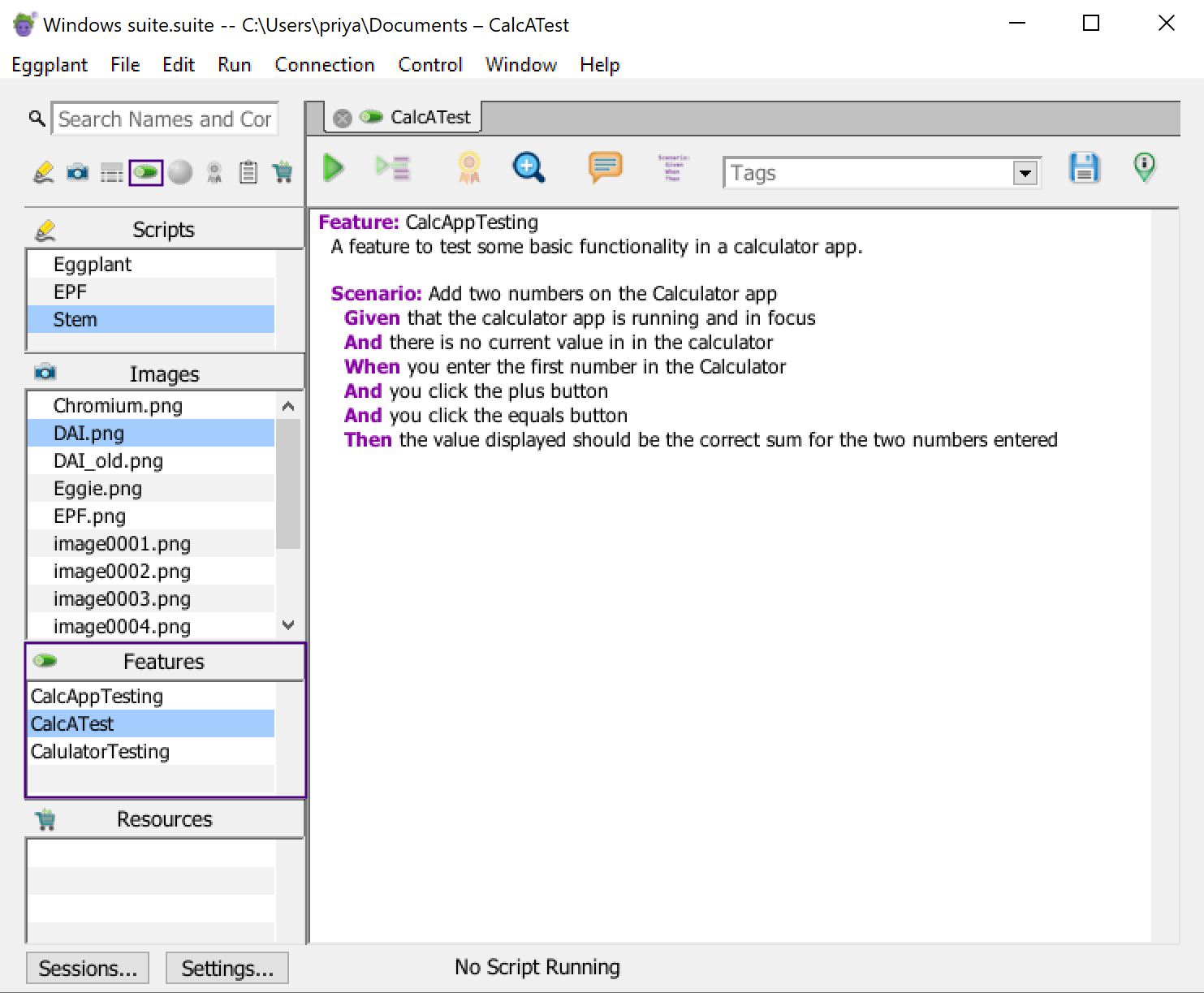
Suiteウィンドウでハイライト表示されたFeaturesペイン
サイドバーの上部にあるAssets Toggle Barでは、Gherkin(pickle)アイコンに注意してください。このボタンを使用して、Featuresペインの表示をオンまたはオフに切り替えることができます。
Gherkinのコードは.featureファイルに格納され、テストをフィーチャーとその期待される振る舞いとして記述し、シナリオに分割します。その後、Gherkinステップが記述するアクションを実行するSenseTalkハンドラーを生成します。
GherkinコードはFeaturesエディタータブで書きますが、関連するSenseTalkハンドラーは標準のEggplant Functionalスクリプトに格納されます。Gherkinテストを実行すると、Eggplant Functionalは関連するスクリプトからハンドラーを呼び出して必要なアクションを実行します。詳細については、Eggplant FunctionalでのGherkinテストの実行を参照してください。
既存のGherkinテストの検索
スイート内の特定のGherkin機能を検索するには、スクリプトリストの上の検索フィールドに名前や機能テキストの一部を入力します。(注:この検索機能は、左サイドバーのすべてのペインを同時に検索します。)検索フィルターを設定するには、検索フィールドの横にある拡大鏡をクリックし、ドロップダウンリストからSearch All、Search Names、またはSearch Contentsを選択します。
検索は入力と同時に動作しますので、検索語を全て入力し終わる前に結果を見つけることができるかもしれません。ただし、頻繁に繰り返す検索がある場合は、検索語を入力した後にReturnを押すことで、検索を検索履歴の項目として保存できます。検索は、拡大鏡の下のドロップダウンリストに保存されます。
Suiteウィンドウの検索および置換機能の完全な情報については、検索フィルターの使用を参照してください。
次のステップ
GherkinコードとGherkinでのテスト作成について詳しく知るには、Gherkinでのテスト作成をご覧ください。Gherkinテストを実行すると何が起こるかについては、Eggplant FunctionalでのGherkinテストの実行をご覧ください。