The Create an Injector Family Wizard

When you want to create a new injector family in Eggplant Performance Studio, you launch the Create an Injector Family wizard. The wizard walks you through the process of creating the injector family, including setting basic options such as whether it is a static or cloud injector family.

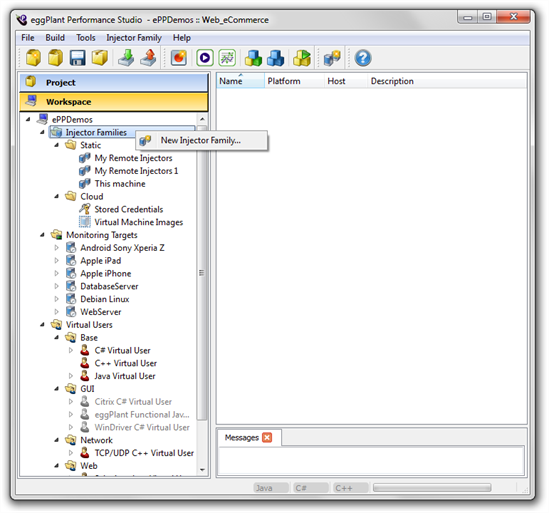
To launch the Create an Injector Family wizard, right-click Injector Families in the workspace tree in Studio and select New Injector Family.
Create Injector Wizard

Starting the Create an Injector Family wizard from the workspace

Note: If you right-click Static under Injector Families and select New Injector Family, the wizard launches with static already selected as the type of injector family to create. Likewise, if you right-click Cloud and select New Injector Family, the wizard launches with cloud selected as the injector family type.


This topic was last updated on 2月 01, 2019, at 11:13:24 午前.

Eggplant icon Eggplant.io | Documentation Home | User Forums | Support | Copyright © 2019 Eggplant