Eggplant Functionalチェッカーの環境設定
これらの環境設定を使用して、SenseTalkスクリプトチェッカーによって返される情報をカスタマイズします。スクリプトチェッカーに関する情報は、SenseTalkスクリプトチェッカーの使用を参照してください。
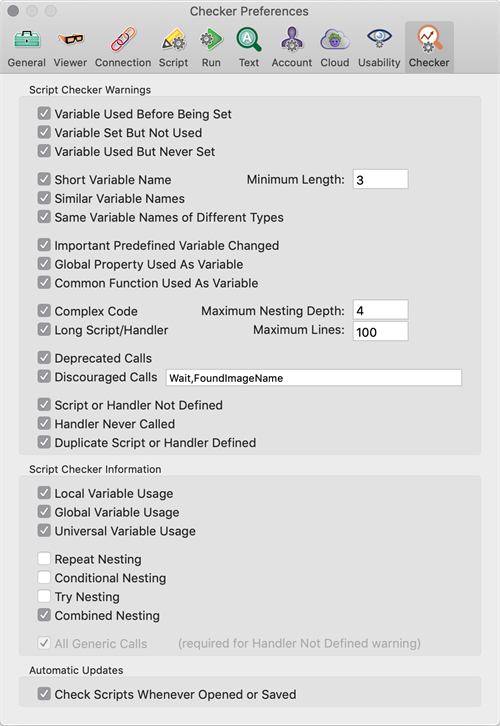
Eggplant Functional 中的 Checker Preferences 选项卡
スクリプトチェッカーの警告
この設定のセクションでは、スクリプトチェッカーの解析によって報告される警告を決定します。
Variable Used Before Being Set: スクリプトで変数が使用され、後で値が設定される場合、警告が返されます。
Variable Set But Not Used: セットされているが後で使用されていない変数に対して警告が返されます。
Variable Used But Never Set: 事前に定義された値がなく、最初にセットされずに使用される変数に対して警告が返されます。
Short Variable Names: 推奨される最小長よりも短い名前で変数が使用される場合、警告が返されます。必要に応じて、最小長フィールドを使用して、デフォルトの3文字を変更できます。
Similar Variable Names: 非常に類似した名前の2つの変数が見つかった場合、警告が返されます。
Same Variable Names of Different Types: 異なるスコープの変数(つまり、ローカルとグローバルとユニバーサル)に同じ変数名が使用されている場合、警告が返されます。
Important Predefined Variable Changed: SenseTalkの重要な事前定義変数(YesやNoなど)が値が変更される場合、警告が返されます。
Global Property Used As Variable: グローバルプロパティ名が変数として使用される場合、警告が返されます。
Common Function Used As Variable: 共通の関数名が変数として使用される場合、警告が返されます。
Complex Code: repeatループ、if/then/else文、またはtry/catchブロックのネストの深さが推奨される最大値を超える場合、警告が返されます。必要に応じて、Maximum Nesting Depthフィールドでデフォルトの深さを変更できます。
Long Script/Handler: スクリプトまたはハンドラが推奨される最大行数を超える場合、警告が返されます。必要に応じて、Maximum Linesフィールドでデフォルトの行数を変更できます。
Deprecated Calls: 非推奨のコマンドや関数が使用される場合、警告が返されます。
Discouraged Calls: 現在のSenseTalkのベストプラクティスまたは独自の設定と一致しないコマンドや関数の使用が推奨されない場合、警告が返されます。デフォルトでは、WaitコマンドとFoundImageName()関数がリストされていますが、カンマ区切りのリストとして追加または削除することができます。
Script or Handler Not Defined: スクリプトまたはハンドラが見つからず、組み込みのコマンドや関数もない場合、警告が返されます。
Handler Never Called: ハンドラが定義されているが呼び出されない場合、警告が返されます。
Duplicate Script or Handler Defined: 同じ名前のスクリプトやハンドラが複数見つかった場合、警告が返されます。
スクリプトチェッカー情報
このセクションでは、スクリプトチェッカーの解析に表示されるスクリプトやハンドラに関する追加情報を選択できます。
Local Variable Usage: このオプションには、ローカル変数が使用される各インスタンスに関する情報が含まれます。
Global Variable Usage: このオプションには、グローバル変数が使用される各インスタンスに関する情報が含まれます。
Universal Variable Usage: このオプションには、ユニバーサル変数が使用される各インスタンスに関する情報が含まれます。
Repeat Nesting: このオプションは、各ハンドラでrepeatループの最も深いネストを報告します。
Conditional Nesting: このオプションは、各ハンドラで条件式(if/then/elseブロック)の最も深いネストを報告します。
Try Nesting: このオプションは、各ハンドラでtryブロックの最も深いネストを報告します。
Combined Nesting: このオプションは、各ハンドラでrepeatループ、条件式、およびtryブロックの最も深い組み合わせネストを報告します。
All Generic Calls: このオプションには、汎用コマンドまたは関数呼び出しが行われる各インスタンスに関する情報が含まれます。Script or Handler Not Defined警告設定でこの設定が必要であり、自動的に選択されることに注意してください。
自動更新
Check Scripts Whenever Opened or Saved: このオプションは、スクリプトを開いたり保存したりするときに、スクリプトチェッカーが現在のスクリプトの解析を自動的に実行するかどうかを決定します。