Cross-Browser and Cross-Platform Scripting
An Eggplant Functional (EPF) script can typically be used across all browsers on all underlying operating systems with little or no modification. This is because the script simply describes the user workflow, which is always the same.
The vast majority of reference images can also be reused across all browsers (for example, across Chrome, Firefox, Safari, Internet Explorer, and Opera) on all operating systems (for example, across Windows, Mac, and Linux). But there are two situations in which reference images may not be re-usable in all environments:
- Different browsers render fonts differently, so text search (rather than image search) should be used as described below.
- The actual browser controls (for example, the refresh button) are different for each browser. So these specific reference images are different for each browser.
To facilitate cross-browser testing, Eggplant Functional supports integration with Sauce Labs. Sauce Labs makes it easy to test a multitude of Browser and OS combinations. See Connecting to Sauce Labs Devices and Browsers for more information.
Best Practices for Cross-Browser and Cross-Platform Scripting
This document presents best practices for efficient cross-browser scripting. In summary:
- Use the Tolerant of Background default search type for images.
- Use OCR text searches, rather than image searches, for interacting with text.
- Separate out core code from OS-specific code for easier test creation.
- Run an environment setup script at the start of every test.
- Run your test from a primary suite.
- Create a naming convention for SUTs.
- Use keyboard commands wherever possible to reduce the need for image capture.
Use OCR and Search Rectangles for Text
One of the first things to do is start by using OCR. The OCR engine in Eggplant Functional works independent of resolution, text size, and color, so if any of these three things differs across your browsers, then you won’t need to recapture any images.
To maximize the reliability and increase the speed of execution of OCR, set the search rectangle around the area where you know the text is going to be.
You can also create a reusable custom function handler that you can use to set the searchRectangle to a portion of the full screen. See Using the ScreenPart Function Handler for examples.
Separate Core Code from OS-specific Code
Most code can be used across operating systems, but there are slight differences in the ways that things work between Windows and Mac. For example, the way you open the browser. You should separate Windows and Mac specific code into separate suites. This means that we can use the same code for Windows and Mac from the perspective of creating the test. In the code examples below, the initial suites are set to the correct image suite, too.
set the initialsuites to ("Path/To/suite")
OpenBrowser
Now, you should have the first suite that Eggplant Functional checks in for code set to your OS-specific code suite. If the function cannot be found there, then Eggplant Functional looks in the core code suite. So, your code would like this:
set the initialsuites to ("Path/To/suite", "Path/To/Core/CodeAndImagesSuite")
VerifiyPrice //This is within the core code suite
OpenBrowser//This is within the OS-specific code suite
Note that images should be saved in the same suite for where they are core to all browsers. Images that are only relevant to a specific OS should be saved in the respective OS-specific suites.
Run an Environment Setup Script at the Start of Every Test
To make everything simpler, you should have the core code and images suite, the OS-specific code, and images suites and the environment setup suite stored in the same folder. Your environment setup script should look something like the example below. In this, we determine the path to the suites using the relative path of where the suite is, so even if the suites move, the code still works.
set SUTName to the name of connectioninfo()
set SuitePath to the folder of the folder of the folder of me

put (Windows_7:"Windows","OSX_1055":"Mac") into SUTOSList
//Define which OS a device is to pick the correct device specific functions
set SUTOS to SUTOSList.(SUTName)

put (Windows_7:"Windows","OSX_1055":"Mac") into SUTSuiteList //Define what suite of images a device should use
set SUTSuite to SUTSuiteList.(SUTName)

//Set up path to core functions, OS functions and device images
set the initialsuites to (SuitePath & "Asset_" & "Core_Functions.suite",SuitePath & "Asset_" & SUTOS & "_Functions" & ".suite")
Now, we need to have the environment set up script run before each test we run. The easiest way to do this is to add the environment set up suite as a helper suite to all of your image and code suites. Then, you can have the environment setup script run before any script/image in that suite is picked. Below is in image showing where you can add the Helper suite and have the environment setup script run:
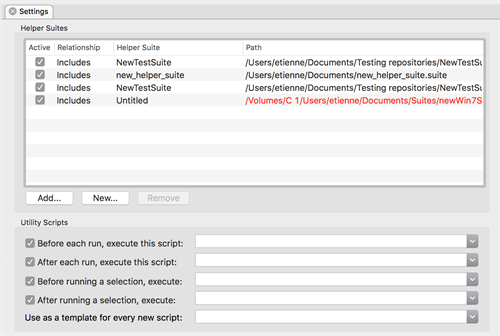
Helper suite environment setup script specified in Eggplant Functional Settings
You can also set up your Helper suites using relative paths, so that if you happen to move your suites to a different path, the helper suite paths are still valid. Information on how to do this can be found here.
Run Your Tests From A Primary Suite
Create your tests from the core code that you have written in a separate suite. This makes maintenance easier in the future, and allows for the greatest reuse of code amongst large teams. For each test design suite that you make, you should add the environment setup suite as a helper suite, to set up all of the code paths. Your test design suites should then look quite flat, whereby you are just ordering the core functions you have written in the way you want. An example is given below:
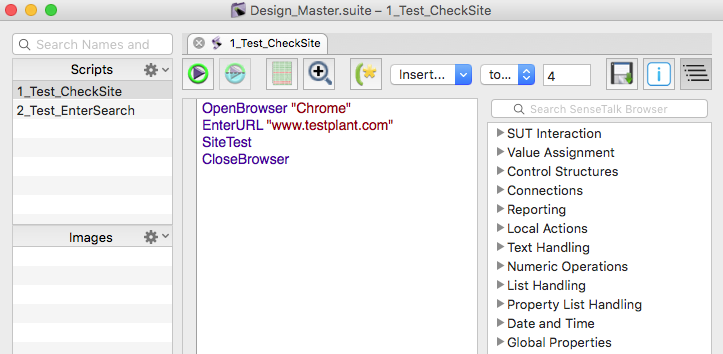
Running tests from a primary suite
Create a Naming Convention for SUTs
To be able to determine what SUT we are connected to, the best thing to do is create a good naming convention for your SUT. This should take the following format: SUTOperatingSystem_OperatingSystemVersion. This makes it simple for Eggplant Functional to determine what device we are connected to and then set up the environment accordingly. A few examples are given below:
Windows_7 where Windows is the SUT OS and 7 is the OS version.
OSX_1055 where OSX is the SUT OS and 10.5.5 is the OS version.
Use Keyboard Commands to Make Scripting More Efficient
It is efficient to use keyboard commands in your scripts wherever possible. A few good examples of this on desktop are below:
//Windows
typetext altKey,f4//Close a window
typetext altKey,tab//Tab between open windows
typetext altkey,escape//Tab through windows in the order that they were opened
typetext controlkey,escape//Display the Start menu
//Mac
typetext commandkey,F//Open a Find window
typetext commandkey,space//Open spotlight
typetext commandkey,tab//Tab between open windows
typetext commandkey, shiftkey, c //Open the Computer window
A full list of shortcuts for Windows and Mac can be found at the below links:
Windows: Keyboard shortcuts