The Images Pane
The Images pane on the left sidebar of the Eggplant Functional (EPF) Suite window lists all the images, image folders, and image tags that are part of the suite. You can add tags, add folders, and rearrange images in the pane.
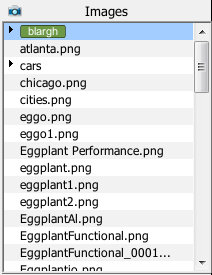
The Images pane in the Eggplant Functional Suite Window
View Options
You can customize how the Images pane displays your images. You can use folders, tags, and found dates to organize the Images pane. If you hover over an image name in the pane, a pop-up window displays the image itself, along with the date it was last edited, its size, and when it was last found in an Eggplant Functional search.
Image Folders
Folders are identified by a triangle to the left of the name in the list. Click the arrow to expand the list to show the images within. If you hover over a folder, a pop-up window displays the first image within the folder; the number in the upper right corner of that window indicates the number of images in the folder.
By default, folders are displayed first in the Images list, followed by images that aren't collected in folders. Right-click in the Images pane and clear the selection for Show Folders First if you want folders and individual images alphabetized together.
To create a new image folder, right-click in the Images pane, select New Folder, then enter a folder name. To delete an image folder, select one or more items in the image list, right-click, and select Delete. If you delete a folder, the images inside it are deleted, as well.
Image Tags
Tags are a way to categorize images in your suite without placing them in separate folders.
To add tags to images from the Images pane, select the images you want to tag, then right-click and select Apply Tags from the pop-up menu. You can apply existing tags to the selected images, as well as create new tags, in the Apply Tags window. Note that tag names can't contain spaces.
To delete a tag, right-click it, then select Delete from the pop-up menu. This process deletes the tag, not any images related to the tag.
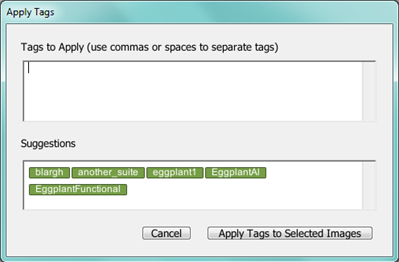
The Apply Tags window in Eggplant Functional
You can assign multiple tags to any image. If you don't want to see tags in the Images pane, right-click in the pane and clear the Show Tags option. To view tags first in the Images pane, right-click in the pane and select Show Tags First.
Images from Helper Suites
When you add helper suites on the Settings tab, their images are shown by default in the Images pane. Helper suites and their images display in italic type in the images list. To turn off display of helper suites images, right-click within the Images pane, then select Show Helper Suites Images. On Mac, you can click the gear icon at the top of the pane, then select the menu item from the drop-down list.
When you click on an image from a helper suite, it opens in the Image Viewer and can be edited there. When you double-click on an image from a helper suite, the image opens in a new Suite Window for the suite it belongs to.
Image Usage
To see whether or not an image has been used in a script, right-click in the Images pane and select Show Image Usage. Images that are used in scripts display in green. Those that are not used display in red.
Filter by Date
Filtering images by the date they were last found by Eggplant Functional can be useful if your suite contains a large number of images. Right-click in the Images pane to see the filtering options listed under Show Image(s) Found Within. Images found within the selected time period display in green. Images not found within the selected time period display in red. Images that have no data display in black.
Last found data is not accurate for shared suites, suites under source control, or Eggplant Manager runs. This data is not checked into source control.
Take care when deleting images with no results or with old results, as it's possible that a script that calls the image just hasn't been run on the machine within the specified time frame.
Adding and Deleting Images
There are two ways to add outside images to an Eggplant Functional suite:
- Drag one or more images or image folders from another location into the Images pane.
- Right-click in the Images pane, select Add Images, then locate and add images or image folders through the file browser.
Eggplant Functional accepts images in the following file formats: .bmp, .gif, .icns, .ico, .jpg/.jpeg, .pdf, .pict, .png, .tiff.
To delete an image, right-click the image name in the Images Pane, then select Delete from the pop-up menu.
Searching for Existing Images
To search for images in your suite, type an image name or part of an image description in the Search field above the Scripts pane. To set a search filter, click the magnifying glass icon in the Search field and choose Search All, Search Names, or Search Contents from the drop-down list.
This search function searches all the panes in the left sidebar simultaneously.
The search works as you type, so you might find your results before you finish entering your search term. However, if you have searches that you frequently repeat, you can save your search as an item in the Search History by pressing Return after you type the term. Your search is saved on the drop-down list under the magnifying glass.
For complete information about using the search and replace function in the Suite window, see Using the Search Filter.