Getting Started with Eggplant Functional
Eggplant Functional (EPF) is a test automation tool that you can use for the entire testing process, from authoring scripts to evaluating results. It’s quick to get up and running with Eggplant Functional and this page will show you how, by walking you through a basic Eggplant Functional test environment setup on Microsoft Windows.
To demonstrate how easy it is to set up and run tests with Eggplant Functional, we will configure one system to be both your Eggplant Functional host machine and system under test or "SUT." When you complete the setup detailed below, your Windows machine will be configured to run Eggplant Functional and connect to itself as a SUT, and you’ll be ready to use Eggplant Functional.
While this walkthrough demonstrates the simpler set up of one machine as both the Eggplant Functional host machine and SUT (called a "Single System model"), Eggplant Functional was designed to run as a two-system model, where Eggplant Functional is on a separate machine from the SUT. See Creating Your First SUT Connection for information about setting up Eggplant Functional and a SUT in a two-system model.
Step by Step: Setting Up Eggplant Functional
For many users, the Eggplant machine will be your everyday workstation. It can be a Windows, Mac, or Linux machine. But for the sake of this demonstration, we are using a Windows machine as our Eggplant machine.
Follow the steps below to install and license Eggplant Functional, and then set up the same machine as a SUT. Contact our Customer Support with any questions about this process.
Step 1. Download and Install Eggplant Functional
-
You can download Eggplant Functional from the Eggplant Functional Downloads page.
-
Install Eggplant Functional by running the Setup program you downloaded.
-
As stated above the steps in this walkthrough are for installing Eggplant Functional on a Windows machine. For information about all supported operating systems and recommended hardware configurations for the Eggplant machine, see Prerequisites. For information about installing Eggplant Functional on all supported platforms, see Installing Eggplant Functional.
Step 2. License Eggplant Functional
-
You can get a free trial key from Eggplant's trial key request page.
-
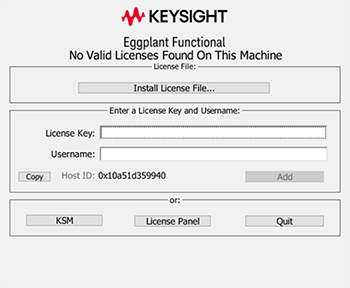
To license Eggplant Functional with a trial key, launch the application and wait for the licensing splash screen shown below to open. Then copy your trial key, paste it into the License Key field, and click Add.
- If you are a current customer, see Licensing Eggplant Functional to learn how to license Eggplant Functional with your full-term key.
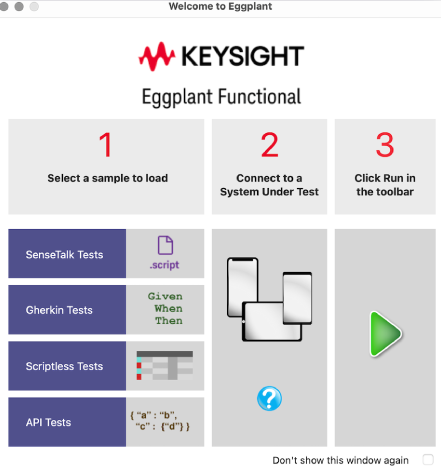
When your license is validated, the Eggplant Functional application opens displaying the Welcome panel.
Step 3. Configure the Eggplant Machine to also be your SUT
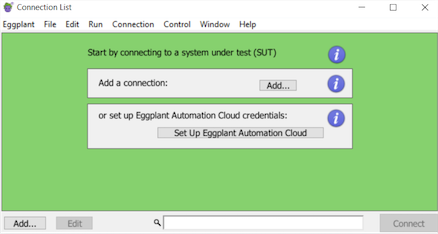
- Launch Eggplant Functional, if it is not already running on the Eggplant machine, and open the Connection List. (Choose Connection > Connection List from the main Eggplant Functional menu.) When the Connection List opens, and no connections have been created, it looks like the following sample screen.
-
Click either of the Add buttons to create your SUT. The New Connection panel opens.
-
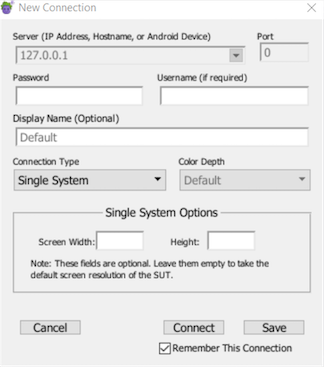
Select Single System from the Connection Type drop-down list. (Note that the default connection type, VNC Automatic, is not shown). You will see that the fields on the panel change when you make the selection as shown in the following sample screen.
-
Provide a name for your SUT in the Display Name field, and then specify your user and password. These will be the credentials you use to log into your Eggplant machine.
-
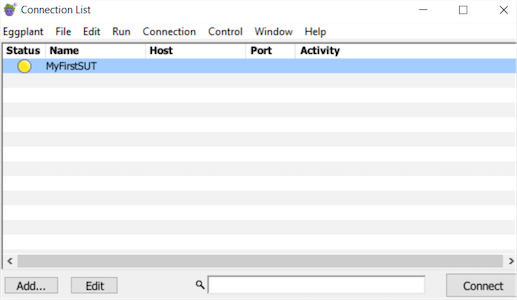
Click Save to save your connection. You will see your new connection in the Connection List as shown in the sample screen below:
Step 4. Connect to your SUT
- Select your SUT in the Connection List and click the Connect button. After a few moments, the Eggplant Functional Viewer window will open displaying your SUT desktop. Because this is a single-system configuration, your SUT is actually a second session into your Eggplant machine.
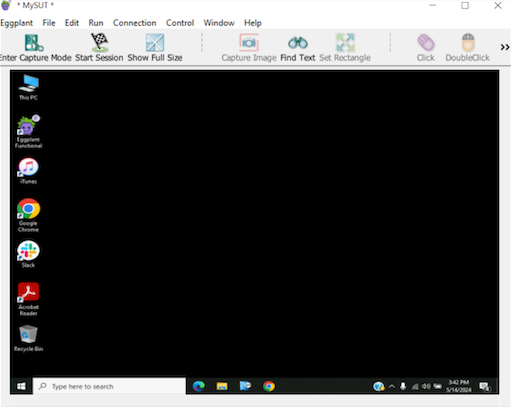
There are a few limitations to the Single System connection type in Eggplant Functional. For example, you cannot run your browser on both the desktop session where you are running Eggplant Functional and the SUT session. Your browser can only run in one of these sessions at a time. For more information about testing with Single System connections, see Connecting to the Same Machine (Single Machine Testing).
You are now ready to start writing scripts and running tests with Egglant Functional!
Next Steps
Now that your initial environment is set up, you should be ready to dive in and begin your automated testing experience. The following links will help you get a deeper understanding of how to use Eggplant Functional to satisfy your testing needs.
- Tour Eggplant Functional: To begin, you might want to take a moment to familiarize yourself with the Eggplant Functional UI.
- Creating Scripts with Eggplant Functional: Learn about the different methods Eggplant Functional offers for creating scripts to drive your automation.
- Top 10 SenseTalk Commands and Functions for Eggplant Functional Scripting: Find out about the most common and useful SenseTalk code you might use in your testing.
- Running Eggplant Functional Scripts: After you've developed scripts, you can run them from Eggplant Functional as well as from the command line and other methods.