Connection Preferences
These Eggplant Functional preferences pertain to System Under Test (SUT) connections and communication.
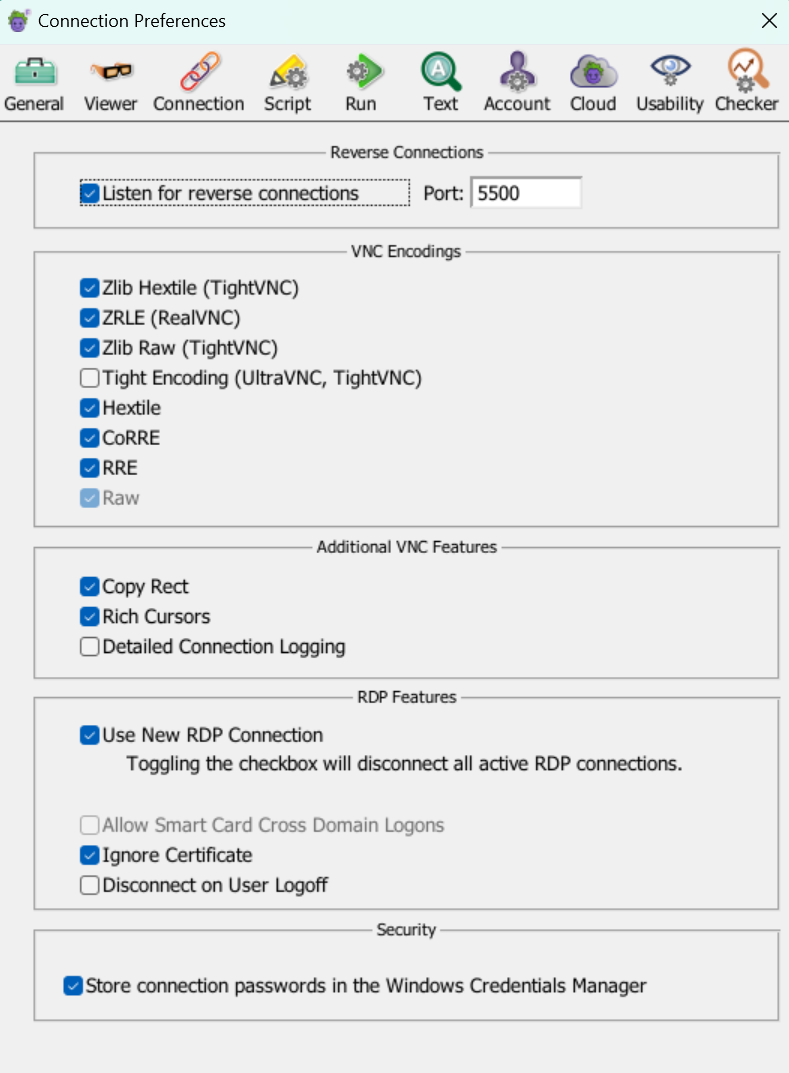
The Connection Preferences panel on Windows
Reverse Connections
Listen for reverse connections: Select this checkbox to allow SUTs to initiate VNC connections with the local computer running Eggplant Functional. Indicate the relevant port in the Port field.
VNC Encodings
This is a list of the common encodings in which data is transferred over VNC connections. The encodings appear in order from most compressed to least compressed, and Eggplant Functional always starts at the top of the list and attempts to use the most compressed encoding available.
Most computers experience the best VNC performance by using the fastest (most compressed) encoding available; however, if you feel that your processor’s ability to decompress and draw data is more of a limiting factor than your connection speed, you can disable the more compressed encodings.
Tight Encoding, which is not selected by default, is useful for very slow connections. Note that using this type of compression can make image matching less reliable in Eggplant Functional.
Additional VNC Features
Copy Rect: Allows faster updates in the Viewer window by redrawing only the portions of the SUT that have changed.
Rich Cursors: Allows faster updates in the Viewer window by receiving cursor updates as screen locations, rather than re-drawn cursors.
Detailed Connection Logging: Logs some additional information during connections for troubleshooting purposes. On Mac this information is recorded in Console. On Windows this information is recorded in the Windows Event Viewer.
RDP Features
Use New RDP Connection: Enabled by default. "New RDP" refers to a newer implementation of the RDP connection type in Eggplant Functional. The "New RDP" option provides the most secure, robust, and up-to-date RDP connections to your systems under test (SUTs).
Starting with the EPF 26.2 release, the Use New RDP Connection option is enabled by default. In an upcoming release, the older RDP implementation will no longer be available. Eggplant introduced this new implementation in in EPF 26.1.1 as described in the EPF 26.1.1 Release Notes.
Allow Smart Card Cross Domain Logons: Allows or restricts use of smart card logons by non-domain members. Domain members can use smart card logons regardless of how this default is set. Note that a "non-domain user" is a username that is not known to the domain server, while a "domain user" is a username that is known to the domain server. This setting is only enabled when using the original RDP (by de-selecting the Use New RDP Connection checkbox).
Ignore Certificate: Enabled by default. Ignores the certificate when making an RDP connection.
Disconnect on User Logoff: Disconnects the RDP session when the user logs off.
Security
Store Connection Passwords: This operating system-specific checkbox determines whether or not Eggplant Functional stores your SUT connection passwords securely in your computer's credential management tool.