Release Notes
The notes below describe the new features and changes by release.
Eggplant Monitoring Version 2.5.7
The 2.5.7 release of Eggplant Monitoring contains the following features:
Postman Collection Import
We’ve made creating Web Services monitors faster and simpler. You can now upload your Postman Collections to set up a new API monitor, saving setup time. Once you submit the Collection our Customer Support team will review the new monitor before adding it to your account.
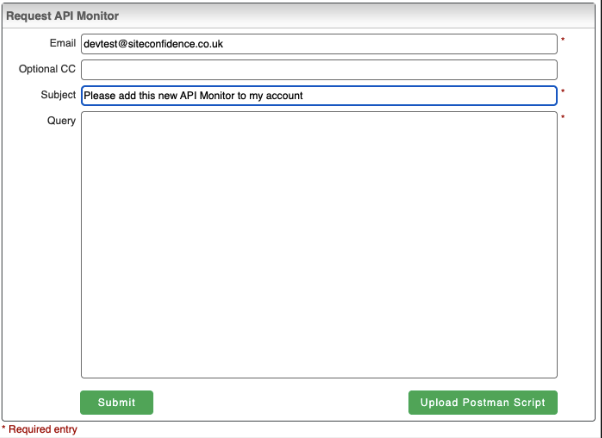
Request API Monitor
Updated Tools including new Page Analyzer
We’ve given our Tools section a complete overhaul. In addition to the current tools that you know and love we’ve also added:
-
HTTP Status Checks
-
SSL Certificate Checks
-
Whois
We’ve also given the Page Analyzer a total overhaul, now allowing you to compare multiple URLs and provide you with a complete breakdown of their Core Web Vitals performance metrics.
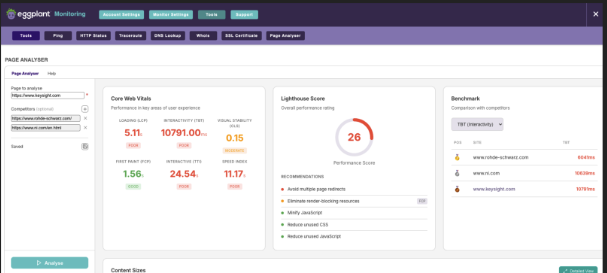
The improved Page Analyzer can show comparisons of multiple URLs and a breakdown of Core Web Vitals performance metrics
Updated Mobile App
Whilst we continue to make security updates to our entire platform, in this release we updated several security certificates related to the push mechanism in our iOS app.
As a reminder, both iOS and Android apps are available in the relevant app stores.
Eggplant Monitoring Version 2.5.4
The 2.5.4 release of Eggplant Monitoring contains the following features:
User Management of Admin Scheduler for Monitoring and Alerting
Users now have fine-grain control over the scheduling for both their Monitoring and Alerting periods through the customer portal.
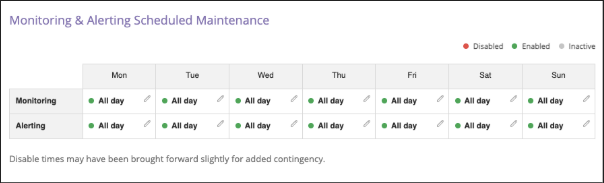
A sample Monitoring & Alerting maintenance schedule
This allows user to configure ‘blackout’ periods for when they know sites or applications being monitored are likely to be unavailable, for example because of pre-defined maintenance periods.
With this new self-service feature, you have complete control to:
-
Create new scheduled maintenance events
-
Edit existing maintenance schedules
-
Delete or set as inactive upcoming maintenance
For a step-by-step guide, including how to set up, edit, or cancel your scheduled maintenance, see Managing Monitoring and Alerting Scheduled Maintenance.