Run Preferences
Run Preferences are the default values of frequently used run options.
To change these values for an individual script, use the SetOption command or set the global property within the script. For more information, see Run Options Global Properties.
To restore all run options (from all five tabs) to their default value, click Restore Default Run Options at the bottom of the preferences panel.
Mouse
The Mouse settings determine specific mouse behavior in the Viewer window during script execution.
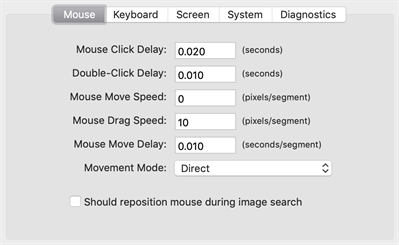
The Mouse tab in Eggplant Functional Run Preferences
Mouse Click Delay: This value represents the time between the press and release of a mouse click on the SUT.
Double-Click Delay: This value represents the time between the release of the first click and the press of the second click of a DoubleClick command.
Mouse Move Speed: This value represents the maximum distance the mouse cursor can move per segment.
Mouse Drag Speed. This value represents the maximum distance the mouse cursor can drag per segment.
Mouse Move Delay: This value represents the delay between segments of mouse movement.
Movement Mode: This pop-up menu determines the path a mouse cursor takes when it moves from one place to another. Choose Direct, Horizontal Then Vertical, or Vertical Then Horizontal.
Should reposition mouse during image search: Select this checkbox to have Eggplant Functional (EPF) move the mouse to the bottom right corner after an initial image search that did not reveal a match.
Keyboard
The Keyboard preferences determine specific keyboard behavior in the Viewer window during script execution. For more information, see Run Options Global Properties.
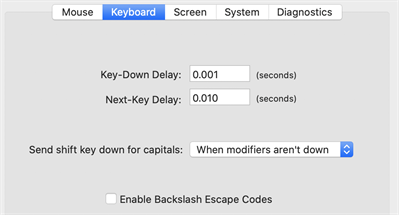
The Keyboard settings tab in Eggplant Functional Run Preferences
Key-Down Delay: This value represents the length of time between a key press and release.
Next-Key Delay: This value represents the delay between typed keystrokes.
Send shift key down for capitals: This pop-up menu determines the whether or not Eggplant Functional will hold the SUT's Shift key while typing capital letters. Choose from Always, Never, or When modifiers aren't down. If Never is selected, Eggplant Functional sends capital-letter key codes to the SUT, without using the Shift key.
Enable Backslash Escape Codes: Select this checkbox to allow Eggplant Functional to recognize backslash escape codes in scripts.
Screen
The Screen preferences determine search time and image tolerance in the Viewer window.
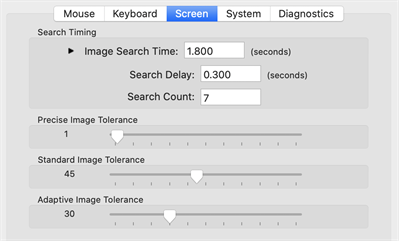
The Screen settings tab in Eggplant Functional Run Preferences
Search Timing
Image Search Time: The number in this field represents the approximate maximum time that you want to allow Eggplant Functional to find an image match in the Viewer window. The actual time can be longer than the time specified here, depending on other factors related to the search.
-
Search Delay: The value in this field is time between one image search and the next.
-
Search Count: The value in this field represents the number of times Eggplant Functional searches for a single image match.
ノートIf you set the search count value to 1, Eggplant Functional does not perform a full-screen refresh and repositions the mouse before failing. This approach can reduce delay when searching for images that are not present in the Remote screen, but it can also cause unnecessary failures due to screen artifacts and timing errors.
The Image Search Time is equal to the Image Search Delay multiplied by one less than the Image Search Count. Changing the Image Search Time affects the other two values, and vice versa.
Precise Image Tolerance
The position of this slider determines the level of precision Eggplant Functional requires to match an image with a tolerant search. The number represents the maximum difference between an original pixel’s RGB value and the RGB value of a presumed match in the Viewer window.
Standard Image Tolerance
The position of this slider determines the level of precision Eggplant Functional requires to match an image with a standard search. The number represents the maximum difference between an original pixel’s RGB value and the RGB value of a presumed match in the Viewer window.
These image tolerance values affect your searches throughout every script you run in Eggplant Functional. If you need to change these values, it is usually best to do it on a script-by-script basis.
Adaptive Image Tolerance
The position of this slider determines the amount of variation allowed in the overall image when considering a match. A low value like 1 requires a near-perfect match. The higher the tolerance value, the more variation is allowed in the overall image when considering a match.
System
The options in the System pane determine how Eggplant Functional interacts directly with the remote system.
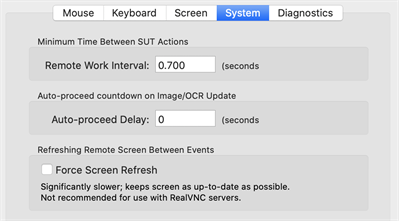
The System tab in Eggplant Functional Run Preferences
Minimum Time Between SUT Actions
Remote Work Interval: The value in this fields represents the minimum delay between two commands that interact with the SUT. For more information, see the RemoteWorkInterval, in the Run Options Global Properties.
Auto-proceed countdown on Image/OCR Update
Auto-proceed Delay: The time you have to act on a manual Image Update event. When the time is up, the script proceeds normally. To turn off the Image Update timer, set the Auto-proceed Delay to 0. Note that this setting applies to the Image Update panel and the OCR Update panel. (For information about using the Image Update panel, see The Image Update Panel. For information about the OCR Update panel, see The OCR Update Panel.)
Refreshing Remote Screen Between Events
Force Screen Refresh: Select this checkbox to force the Viewer window to redraw the SUT after every line of script executed. For more information, see The ForceScreenRefresh.
Diagnostics
The selections in the Diagnostics tab define which search diagnostics are used in the Image Update panel and the OCR Update panel.
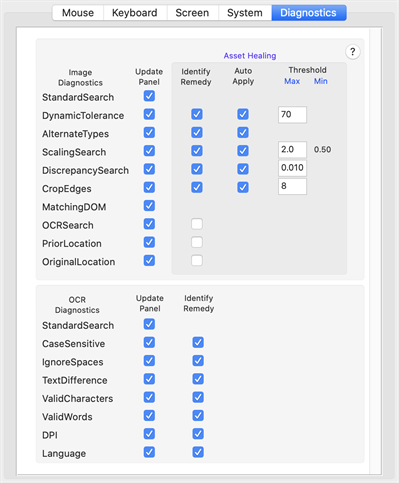
The Diagnostics tab in Eggplant Functional Run Preferences
Image Diagnostics
The settings in this section determine which search diagnostics are used for image searches and Asset Healing. The order of precedence for these diagnostics follows their top-to-bottom order in the preferences panel.
Some of these diagnostic methods can be automatically applied during a script run, without user input. Select Identify Remedy to allow Eggplant Functional to suggest a remedy to use to find an image. Select Auto Apply and define any relevant Thresholds to enable automatic application of remedies to fix your assets. The Auto Update panel guides you if you need to alter a threshold setting for Auto Apply to work.
Automatic Asset Healing became available in Eggplant Functional 21.0.0.
You can use the ImageUpdateDiagnostics global property or the AutoImageUpdateDiagnostics global property to temporarily change the diagnostics for this type of search within a script. Changing values by using the global property does not affect the settings in the Preferences panel.
StandardSearch: Searches for the image again in its normal state with no adjustments.
DynamicTolerance: Tolerance represents the acceptable color difference between pixels in an image and a match in the Viewer window. This search type works by adjusting the image's tolerance setting. It starts at the image's normal tolerance setting and gradually raises the tolerance until the image is found in the Viewer window.
AlternateTypes: Searches by applying the five search types in order of leniency until a match is found.
ScalingSearch: Searches by looking for the image at a variety of different scales, ranging from 0.5 to 2.0, until a match is found. The minimum value is the inverse of the maximum.
DiscrepancySearch: Searches by gradually increasing the image's discrepancy setting until a match is found.
CropEdges: Searches by progressively cropping in on the image, looking for smaller and smaller images. As long as the inside of the image does not match anything else on the screen, the edges are not important. Measured in pixels.
MatchingDOM: Searches for an asset using DOM properties. This remedy works for mobile WebDriver connections only and can be useful when testing across mobile platforms. This search type isn't available if you're using Asset Healing.
OCRSearch: Searches for text in your image and attempts to find instances of that text on the screen.
PriorLocation: Searches the location where your image was last found in a successfully completed test.
OriginalLocation: Searches the location of the selected image at the time of the original capture.
Thresholds
These apply only with Auto Apply selected. Eggplant Functional uses these thresholds to automatically apply the remedy used to find an asset during an image search.
Save as new Image Rep: Select this checkbox to save a new representation of your image instead of applying a remedy to the original image. If you are working with an image collection, the new image representation is added to the collection. If you are not working with an image collection, Eggplant Functional creates one for you containing both the original image and the new representation.
The Save as new Image Rep option is available starting in Eggplant Functional 21.1.0.
OCR Diagnostics
The settings in this section determine which search diagnostics are used for OCR text searches. Some OCR diagnostics can be set to Identify Remedy, which works when you run tests with Auto Update enabled (Run > Image Update > Auto Update (Log Changes)). This functionality applies different search parameters to create a match and continue the script without user interaction. Changes made in Auto Update are applied in the current script run only; you'll need to edit your script manually to make the search setting changes permanent.
You can use the OCRUpdateDiagnostics global property or the AutoOCRUpdateDiagnostics global property to temporarily change the diagnostics for this type of search within a script. Changing values using the global property does not affect the settings in the Preferences panel.
StandardSearch: Searches for the text again using the original specifications. A result for this search means that the text has appeared since the first failure to find it. Most likely this means that the timing of the script at the step needs to be adjusted to allow more time for the desired text to appear.
CaseSensitive: OCR searches are not case sensitive by default. Use the caseSensitive parameter to force searches to respect case and return only results that match your text string's capitalization exactly.
IgnoreSpaces: This diagnostic looks for matches without respect to blank spaces, either in the text string you're searching for or in potential matches on the SUT screen. For example, the OCR engine would match either "Egg plant" or "Eggplant" if your search string was "Eggplant." This parameter is on by default for OCR text searches, so the diagnostic generally suggests a possible match only if you've used ignoreSpaces:"No" in your script.
TextDifference: This diagnostic attempts to find a match by looking for text that can have individual characters that are different from your original string. This parameter can be useful because the OCR engine can sometimes misread text on the screen, mistaking a 0 for an O, for instance. The "text difference" is the number of characters that would need to change between your search string and the text found on screen to make an exact match.
ValidCharacters: The ValidCharacters property limits the characters that the OCR engine will recognize. By default, the engine uses the entire set of characters for the language (or languages) in the current text platform. Sometimes, by limiting the characters, you can force the engine to "see" your text string. You can use the asterisk as a wildcard, ValidCharacters:"*", so that the OCR engine looks only for the characters in your original text string. The ValidCharacters property is overridden by any ValidWords property that is set.
ValidWords: Limiting the words that OCR can consider a match allows you to steer the OCR engine toward a successful match, or force the engine to recognize your text string correctly. You can use the asterisk (*) as a wildcard so that the OCR engine looks only for the words included in your original text string. This property determines the words provided to OCR as a language dictionary that may be found by the OCR text engine. This means that it overrides the Language property; for more information, see Customize the OCR Engine Dictionary. The ValidWords property also overrides any ValidCharacters setting, so alternate orderings of letters in words provided will also be matched. For example, if ValidWords is set to "top", "pot" will also be found.
DPI: By default OCR searches use 72 DPI for searches. However, if the resolution on the SUT is significantly different, you might be able to find your text by using the DPI parameter to set a different resolution for the search.
Language: Indicates if a match might be made with a language setting other than the default text platform.